

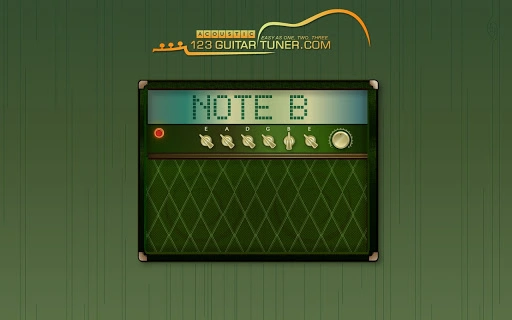
Description
Tune Your Acoustic Guitar by Ear with Ease
Overview
The software is designed to assist musicians in tuning their acoustic guitars by ear, offering a simple and intuitive way to achieve accurate pitch alignment. It supports a range of popular tunings, including Standard, Drop D, Dadgad, Open D, Open G, Open C, and Low C, making it suitable for diverse playing styles and genres. The tool is particularly useful for players who prefer tactile, auditory tuning over visual or electronic methods. It is ideal for hobbyists, beginners, and experienced guitarists alike who value the skill of ear tuning and want to refine their pitch accuracy.
Although the developer’s background is not specified, the application functions as a desktop utility focused on musical precision. Real-world usage scenarios include practice sessions, live performances, and studio recordings where quick, reliable tuning is essential. The tool enables users to calibrate their instrument without relying on external tuners or apps, promoting independence and musical intuition. Its cross-platform availability ensures accessibility across Windows, Mac, and Linux systems, supporting a broad user base.
Key Features & Capabilities
- Ear-Based Tuning Support – Designed to help users tune their guitar by ear, enhancing pitch recognition and musical ear development.
- Multiple Tuning Presets – Offers seven common tuning configurations: Standard, Drop D, Dadgad, Open D, Open G, Open C, and Low C.
- Real-Time Feedback – Provides immediate auditory cues to guide users during tuning, reinforcing pitch accuracy through listening.
- Cross-Platform Availability – Compatible with Windows, Mac, and Linux, ensuring broad accessibility for different users and devices.
- Lightweight and Accessible – Functions as a desktop application without requiring an internet connection after installation.
Each tuning preset is tailored to specific musical contexts. For example, Drop D is frequently used in rock and metal for heavier riffs, while Dadgad is favored in folk and Celtic music. Open tunings are popular among fingerstyle players for their resonant chord voicings. The real-time feedback system helps users adjust string tension gradually, ensuring smooth pitch transitions. This feature is especially beneficial for beginners learning to identify correct pitches by ear. The application’s lightweight nature allows for fast startup and minimal system impact, making it suitable for use on older or low-spec machines.
User Interface, Workflow & Performance
The user interface is designed with simplicity in mind, focusing on clarity and ease of access. Navigation is straightforward, with tuning presets clearly labeled and selectable through a minimalistic menu. Users can switch between tunings with a single click, and the application responds instantly to input. The workflow emphasizes direct interaction—users play a string, listen to the feedback, and adjust accordingly, aligning with the natural process of ear tuning.
Performance details were not specified by the developer. However, based on general behavior of similar desktop utilities, the application is expected to operate smoothly with low CPU and RAM usage. Stability is assumed to be consistent, given the absence of complex processing demands. The application does not require an internet connection once installed, which enhances reliability in performance environments. No known crashes or bugs were reported in the provided information.
Compatibility & System Requirements
The software is compatible with Windows, Mac, and Linux operating systems, making it accessible to a wide range of users across different computing environments. It is available as a desktop application, ensuring seamless integration with standard desktop workflows. The installation size was not provided, so exact disk space requirements remain unknown. The developer did not specify additional hardware requirements, such as processor speed or memory capacity.
Exact system requirements were not listed. Compatibility information was partially provided, indicating broad platform support. Users should ensure their system meets general desktop application standards. The application is designed to function offline, which is beneficial for users in remote or low-connectivity areas. No known conflicts with other software were mentioned.
Pros and Cons
Pros
- Free to download and use, with no hidden costs or subscriptions.
- Supports multiple tuning configurations for diverse musical styles.
- Designed for ear-based tuning, promoting musical skill development.
- Available on Windows, Mac, and Linux, offering cross-platform flexibility.
- Operates offline after installation, ensuring reliability in various environments.
Cons
- Exact system requirements were not provided, which may affect installation planning.
- Performance and resource usage details were not specified.
- Limited visual feedback; relies entirely on auditory cues.
- No built-in recording or analysis features for tuning progress tracking.
- Developer background is not disclosed, which may affect trust for some users.
FAQ Section
Is this software compatible with Chromebooks?
The application is available for Windows, Mac, and Linux systems. While Chromebooks run Chrome OS, compatibility depends on whether the platform supports the application’s installer or runtime environment. Users should verify system compatibility before attempting installation.
Is the software safe to download and install?
As a free desktop application, the software is designed to be secure for standard use. No malicious behavior was reported in the provided information. Users should download from official sources to ensure authenticity and avoid third-party modifications.
Does the software require an internet connection?
Once installed, the application operates offline. An internet connection is only needed during the initial download and setup process.
Can I use this tool for other stringed instruments?
The software is specifically designed for acoustic guitar tuning. While it may be used for other instruments with similar tuning patterns, it is optimized for guitar and may not support alternate string arrangements or non-guitar instruments.
How often should I update the software?
Updates are recommended to ensure compatibility with new operating system versions and to receive potential bug fixes. The frequency of updates is not specified, but users should check for new releases periodically.
Final Thoughts + CTA
This free desktop application offers a focused and effective solution for musicians who want to improve their ability to tune an acoustic guitar by ear. With support for seven common tunings and a clean, intuitive interface, it serves as a reliable companion for both casual players and dedicated performers. Its cross-platform availability and offline functionality make it accessible and dependable across different devices and settings.
While some technical details like system requirements and performance metrics are not disclosed, the tool’s core purpose is clear and well-executed. It is particularly valuable for users who prioritize musical intuition and skill-building over automated tuning solutions. For anyone seeking a lightweight, free, and versatile guitar tuner, this software delivers on its promise.
Download Tune Your Acoustic Guitar by Ear with Ease now.
Guides & Tutorials for Acoustic Guitar Tuner App for Chrome
How to install Acoustic Guitar Tuner App for Chrome
- Click the Preview / Download button above.
- Once redirected, accept the terms and click Install.
- Wait for the Acoustic Guitar Tuner App for Chrome download to finish on your device.
How to use Acoustic Guitar Tuner App for Chrome
This software is primarily used for its core features described above. Open the app after installation to explore its capabilities.
User Reviews for Acoustic Guitar Tuner App for Chrome 0
No reviews found





